Get the developer newsletter
Product updates, how-tos, community spotlights, and more. Delivered monthly to your inbox.
Extended thinking update
Extended thinking capabilities have improved since its initial release, such that we recommend using that feature instead of a dedicated think tool in most cases. Extended thinking provides similar benefits—giving Claude space to reason through complex problems—with better integration and performance. See our extended thinking documentation for implementation details.
As we continue to enhance Claude's complex problem-solving abilities, we've discovered a particularly effective approach: a "think" tool that creates dedicated space for structured thinking during complex tasks.
This simple yet powerful technique—which, as we’ll explain below, is different from Claude’s new “extended thinking” capability (see here for extended thinking implementation details)—has resulted in remarkable improvements in Claude's agentic tool use ability. This includes following policies, making consistent decisions, and handling multi-step problems, all with minimal implementation overhead.
In this post, we'll explore how to implement the “think” tool on different applications, sharing practical guidance for developers based on verified benchmark results.
With the "think" tool, we're giving Claude the ability to include an additional thinking step—complete with its own designated space—as part of getting to its final answer.
While it sounds similar to extended thinking, it's a different concept. Extended thinking is all about what Claude does before it starts generating a response. With extended thinking, Claude deeply considers and iterates on its plan before taking action. The "think" tool is for Claude, once it starts generating a response, to add a step to stop and think about whether it has all the information it needs to move forward. This is particularly helpful when performing long chains of tool calls or in long multi-step conversations with the user.
This makes the “think” tool more suitable for cases where Claude does not have all the information needed to formulate its response from the user query alone, and where it needs to process external information (e.g. information in tool call results). The reasoning Claude performs with the “think” tool is less comprehensive than what can be obtained with extended thinking, and is more focused on new information that the model discovers.
We recommend using extended thinking for simpler tool use scenarios like non-sequential tool calls or straightforward instruction following. Extended thinking is also useful for use cases, like coding, math, and physics, when you don’t need Claude to call tools. The “think” tool is better suited for when Claude needs to call complex tools, analyze tool outputs carefully in long chains of tool calls, navigate policy-heavy environments with detailed guidelines, or make sequential decisions where each step builds on previous ones and mistakes are costly.
Here's a sample implementation using the standard tool specification format that comes from τ-Bench:
{
  "name": "think",
  "description": "Use the tool to think about something. It will not obtain new information or change the database, but just append the thought to the log. Use it when complex reasoning or some cache memory is needed.",
  "input_schema": {
    "type": "object",
    "properties": {
      "thought": {
        "type": "string",
        "description": "A thought to think about."
      }
    },
    "required": ["thought"]
  }
}We evaluated the "think" tool using τ-bench (tau-bench), a comprehensive benchmark designed to test a model’s ability to use tools in realistic customer service scenarios, where the "think" tool is part of the evaluation’s standard environment.
τ-bench evaluates Claude's ability to:
The primary evaluation metric used in τ-bench is pass^k, which measures the probability that all k independent task trials are successful for a given task, averaged across all tasks. Unlike the pass@k metric that is common for other LLM evaluations (which measures if at least one of k trials succeeds), pass^k evaluates consistency and reliability—critical qualities for customer service applications where consistent adherence to policies is essential.
Our evaluation compared several different configurations:
The results showed dramatic improvements when Claude 3.7 effectively used the "think" tool in both the “airline” and “retail” customer service domains of the benchmark:
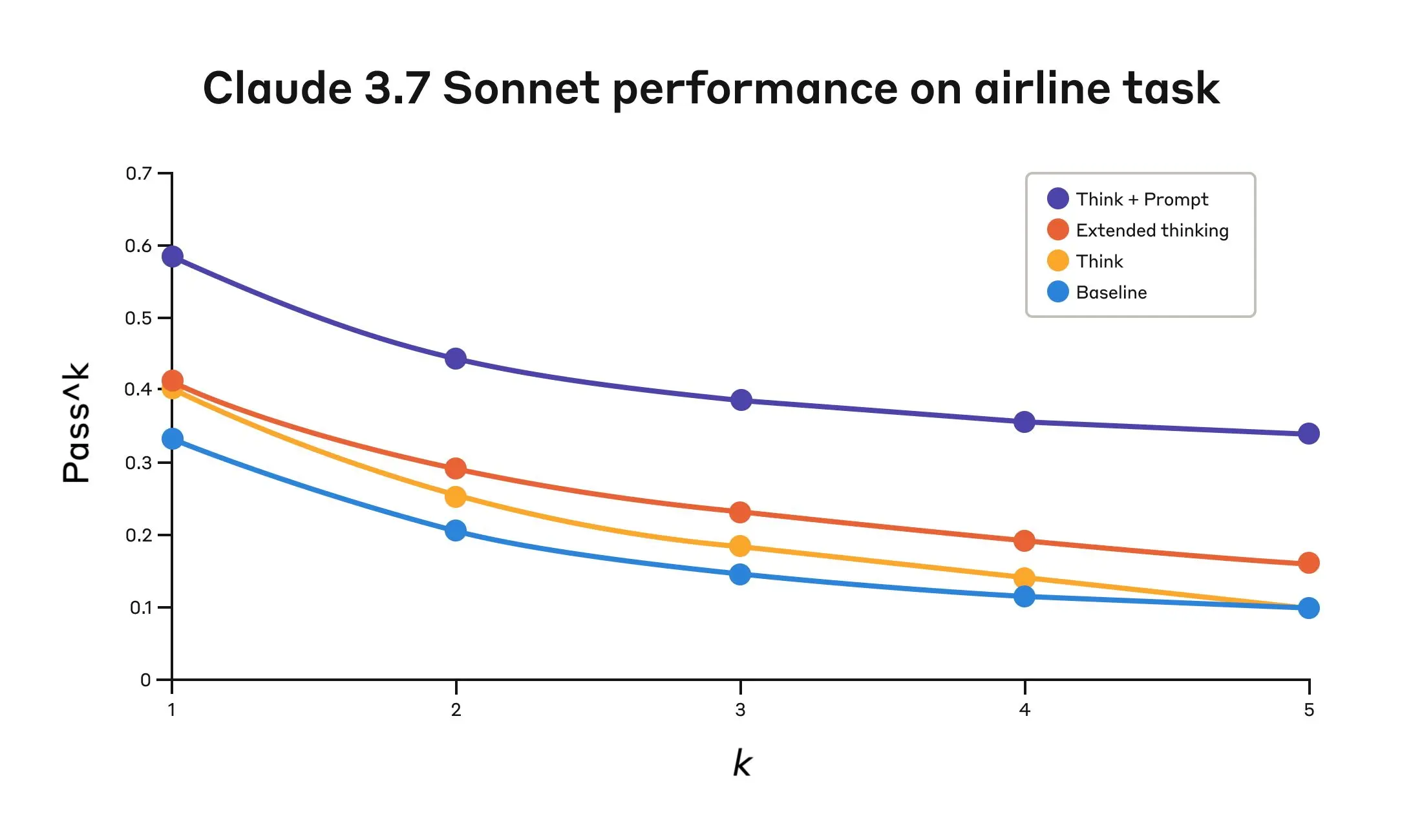
Claude 3.7 Sonnet's performance on the "Airline" domain of the Tau-Bench eval
| Configuration | k=1 | k=2 | k=3 | k=4 | k=5 |
|---|---|---|---|---|---|
| "Think" + Prompt | 0.584 | 0.444 | 0.384 | 0.356 | 0.340 |
| "Think" | 0.404 | 0.254 | 0.186 | 0.140 | 0.100 |
| Extended thinking | 0.412 | 0.290 | 0.232 | 0.192 | 0.160 |
| Baseline | 0.332 | 0.206 | 0.148 | 0.116 | 0.100 |
The best performance in the airline domain was achieved by pairing the “think” tool with an optimized prompt that gives examples of the type of reasoning approaches to use when analyzing customer requests. Below is an example of the optimized prompt:
## Using the think tool

Before taking any action or responding to the user after receiving tool results, use the think tool as a scratchpad to:
- List the specific rules that apply to the current request
- Check if all required information is collected
- Verify that the planned action complies with all policies
- Iterate over tool results for correctness

Here are some examples of what to iterate over inside the think tool:
<think_tool_example_1>
User wants to cancel flight ABC123
- Need to verify: user ID, reservation ID, reason
- Check cancellation rules:
  * Is it within 24h of booking?
  * If not, check ticket class and insurance
- Verify no segments flown or are in the past
- Plan: collect missing info, verify rules, get confirmation
</think_tool_example_1>

<think_tool_example_2>
User wants to book 3 tickets to NYC with 2 checked bags each
- Need user ID to check:
  * Membership tier for baggage allowance
  * Which payments methods exist in profile
- Baggage calculation:
  * Economy class × 3 passengers
  * If regular member: 1 free bag each → 3 extra bags = $150
  * If silver member: 2 free bags each → 0 extra bags = $0
  * If gold member: 3 free bags each → 0 extra bags = $0
- Payment rules to verify:
  * Max 1 travel certificate, 1 credit card, 3 gift cards
  * All payment methods must be in profile
  * Travel certificate remainder goes to waste
- Plan:
1. Get user ID
2. Verify membership level for bag fees
3. Check which payment methods in profile and if their combination is allowed
4. Calculate total: ticket price + any bag fees
5. Get explicit confirmation for booking
</think_tool_example_2>What's particularly interesting is how the different approaches compared. Using the “think” tool with the optimized prompt achieved significantly better results over extended thinking mode (which showed similar performance to the unprompted “think” tool). Using the "think" tool alone (without prompting) improved performance over baseline, but still fell short of the optimized approach.
The combination of the "think" tool with optimized prompting delivered the strongest performance by a significant margin, likely due to the high complexity of the airline policy part of the benchmark, where the model benefitted the most from being given examples of how to “think.”
In the retail domain, we also tested various configurations to understand the specific impact of each approach
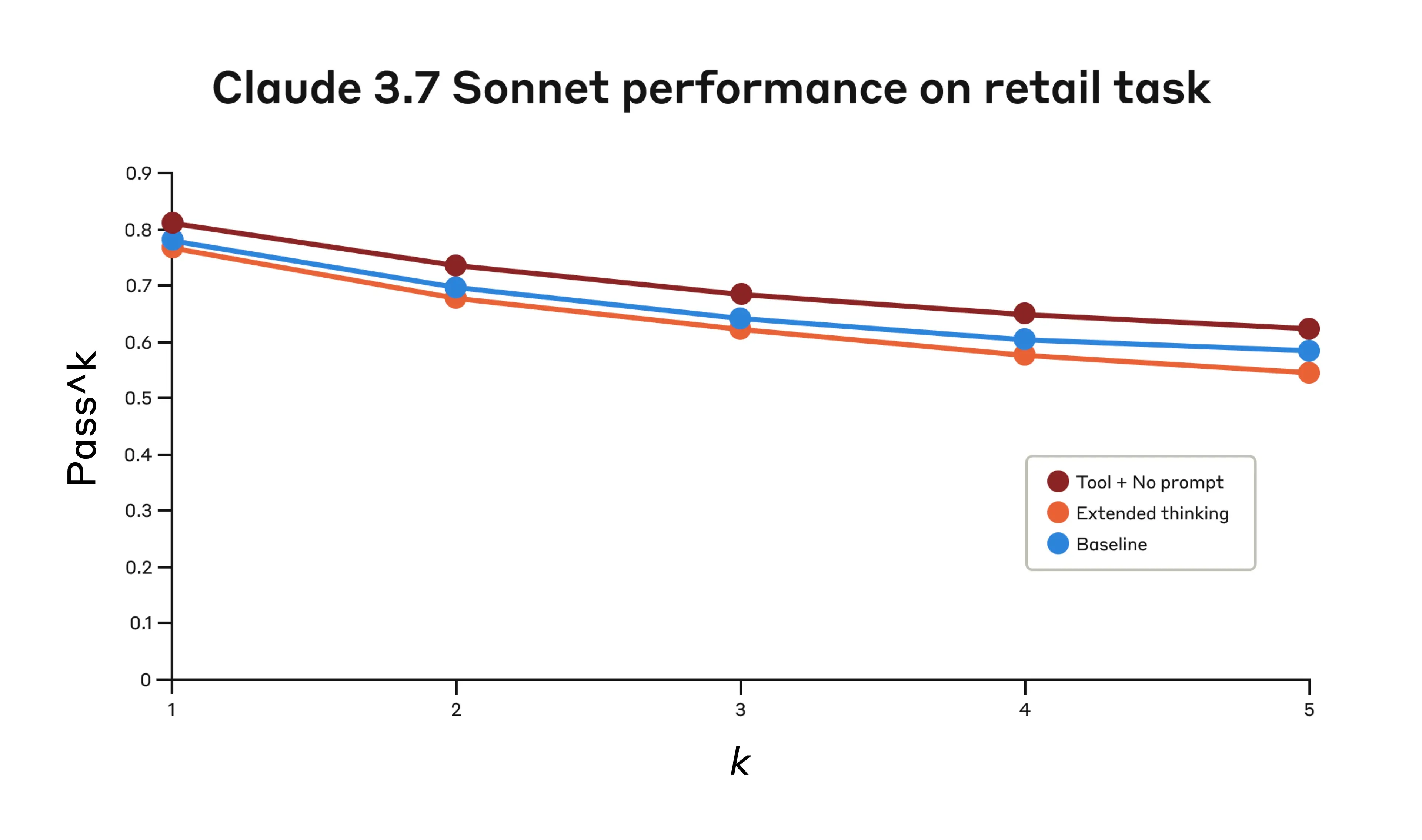
Claude 3.7 Sonnet's performance on the "Retail" domain of the Tau-Bench eval
| Configuration | k=1 | k=2 | k=3 | k=4 | k=5 |
|---|---|---|---|---|---|
| "Think" + no prompt | 0.812 | 0.735 | 0.685 | 0.650 | 0.626 |
| Extended thinking | 0.770 | 0.681 | 0.623 | 0.581 | 0.548 |
| Baseline | 0.783 | 0.695 | 0.643 | 0.607 | 0.583 |
The "think" tool achieved the highest pass^1 score of 0.812 even without additional prompting. The retail policy is noticeably easier to navigate compared to the airline domain, and Claude was able to improve just by having a space to think without further guidance.
Our detailed analysis revealed several patterns that can help you implement the "think" tool effectively:
A similar “think” tool was added to our SWE-bench setup when evaluating Claude 3.7 Sonnet, contributing to the achieved state-of-the-art score of 0.623. The adapted “think” tool definition is given below:
{
  "name": "think",
  "description": "Use the tool to think about something. It will not obtain new information or make any changes to the repository, but just log the thought. Use it when complex reasoning or brainstorming is needed. For example, if you explore the repo and discover the source of a bug, call this tool to brainstorm several unique ways of fixing the bug, and assess which change(s) are likely to be simplest and most effective. Alternatively, if you receive some test results, call this tool to brainstorm ways to fix the failing tests.",
  "input_schema": {
    "type": "object",
    "properties": {
      "thought": {
        "type": "string",
        "description": "Your thoughts."
      }
    },
    "required": ["thought"]
  }
}Our experiments (n=30 samples with "think" tool, n=144 samples without) showed the isolated effects of including this tool improved performance by 1.6% on average (Welch's t-test: t(38.89) = 6.71, p < .001, d = 1.47).
Based on these evaluation results, we've identified specific scenarios where Claude benefits most from the "think" tool:
To get the most out of the "think" tool with Claude, we recommend the following implementation practices based on our τ-bench experiments.
The most effective approach is to provide clear instructions on when and how to use the "think" tool, such as the one used for the τ-bench airline domain. Providing examples tailored to your specific use case significantly improves how effectively the model uses the "think" tool:
We found that, when they were long and/or complex, including instructions about the "think" tool in the system prompt was more effective than placing them in the tool description itself. This approach provides broader context and helps the model better integrate the thinking process into its overall behavior.
Whereas the “think” tool can offer substantial improvements, it is not applicable to all tool use use cases, and does come at the cost of increased prompt length and output tokens. Specifically, we have found the “think” tool does not offer any improvements in the following use cases:
The "think" tool is a straightforward addition to your Claude implementation that can yield meaningful improvements in just a few steps:
The best part is that adding this tool has minimal downside in terms of performance outcomes. It doesn't change external behavior unless Claude decides to use it, and doesn't interfere with your existing tools or workflows.
Our research has demonstrated that the "think" tool can significantly enhance Claude 3.7 Sonnet's performance1 on complex tasks requiring policy adherence and reasoning in long chains of tool calls. “Think” is not a one-size-fits-all solution, but it offers substantial benefits for the correct use cases, all with minimal implementation complexity.
We look forward to seeing how you'll use the "think" tool to build more capable, reliable, and transparent AI systems with Claude.
1. While our τ-Bench results focused on the improvement of Claude 3.7 Sonnet with the “think” tool, our experiments show Claude 3.5 Sonnet (New) is also able to achieve performance gains with the same configuration as 3.7 Sonnet, indicating that this improvement generalizes to other Claude models as well.
Product updates, how-tos, community spotlights, and more. Delivered monthly to your inbox.